DNC-IP100 4K Ultra HD 12MP PoE Underwater IP Camera
Professional 4K underwater video with higher-than-standard-4K 12MP image detail.
The DNC-IP100 is the first Dive And See 4K Ultra HD underwater IP camera, designed for continuous underwater observation, aquaculture monitoring, marine research, industrial inspection, aquarium systems, and remote underwater surveillance.
With a maximum image resolution of 4512 × 2512 pixels at up to 20 frames per second, the DNC-IP100 captures more image detail than standard 4K UHD resolution. This additional resolution helps operators examine underwater subjects, fish, structures, equipment, and activity more closely.
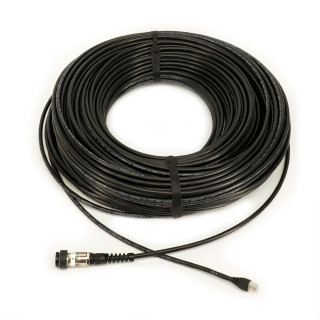
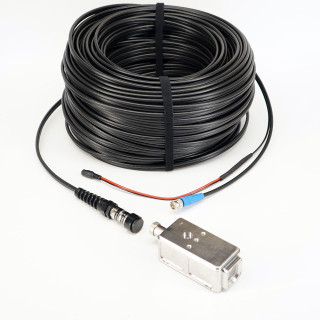
Power and network video are transmitted through a single compatible underwater Ethernet cable. The detachable dry-mate connection allows the camera and external cable to be transported, installed, serviced, or replaced independently.
The camera is housed in a durable 316 stainless steel enclosure for extended use in underwater and marine environments. Unlike underwater cameras with permanently attached cables, the DNC-IP100 works with selected detachable Dive And See underwater Ethernet cables.
Why the DNC-IP100 Is Different
The DNC-IP100 is not simply a standard security camera placed inside a waterproof case. It is configured as a complete sealed underwater camera module intended to become part of a professional monitoring, inspection, research, aquaculture, or custom subsea system.
No Internet Required
Keep live video and recordings inside your local system.
The DNC-IP100 can operate as part of a physically isolated local PoE camera system. Connect the underwater camera directly to a compatible PoE NVR, connect a monitor to the NVR, and record video locally—without connecting the NVR to a router, cloud service, or the Internet.
When the NVR LAN/WAN port is physically disconnected from Internet-connected equipment, the local camera system has no Internet route for transmitting video externally. Remote access remains optional and should only be enabled when the system owner specifically requires it.
Security depends on the complete installation and configuration. For the strongest network isolation, leave the NVR LAN/WAN port physically disconnected, use strong local passwords, restrict physical access, and keep approved equipment firmware current.
DNC-IP100 Key Features
4K Underwater Camera Applications
- Aquaculture, fish farming, and fish behavior monitoring
- Aquarium and aquatic animal observation
- Marine research and underwater experiments
- Industrial underwater inspection and documentation
- Boat, dock, hull, and submerged structure observation
- Water treatment, reservoir, and tank monitoring
- Underwater security and remote observation
- Live underwater video monitoring and recording
- Custom ROV and subsea network video systems
Custom System Options
The standard DNC-IP100 is supplied as a sealed underwater camera module. Qualified projects may require a complete system configuration based on deployment distance, recording method, mounting, number of cameras, and surface equipment.
Custom availability depends on quantity, engineering requirements, component availability, and final technical review.
Complete 4K Ultra HD PoE Underwater Camera System
The DNC-IP100 connects directly to a compatible PoE NVR. A single underwater Ethernet cable carries electrical power, network communication, and high-resolution 4K underwater video between the camera and surface equipment.
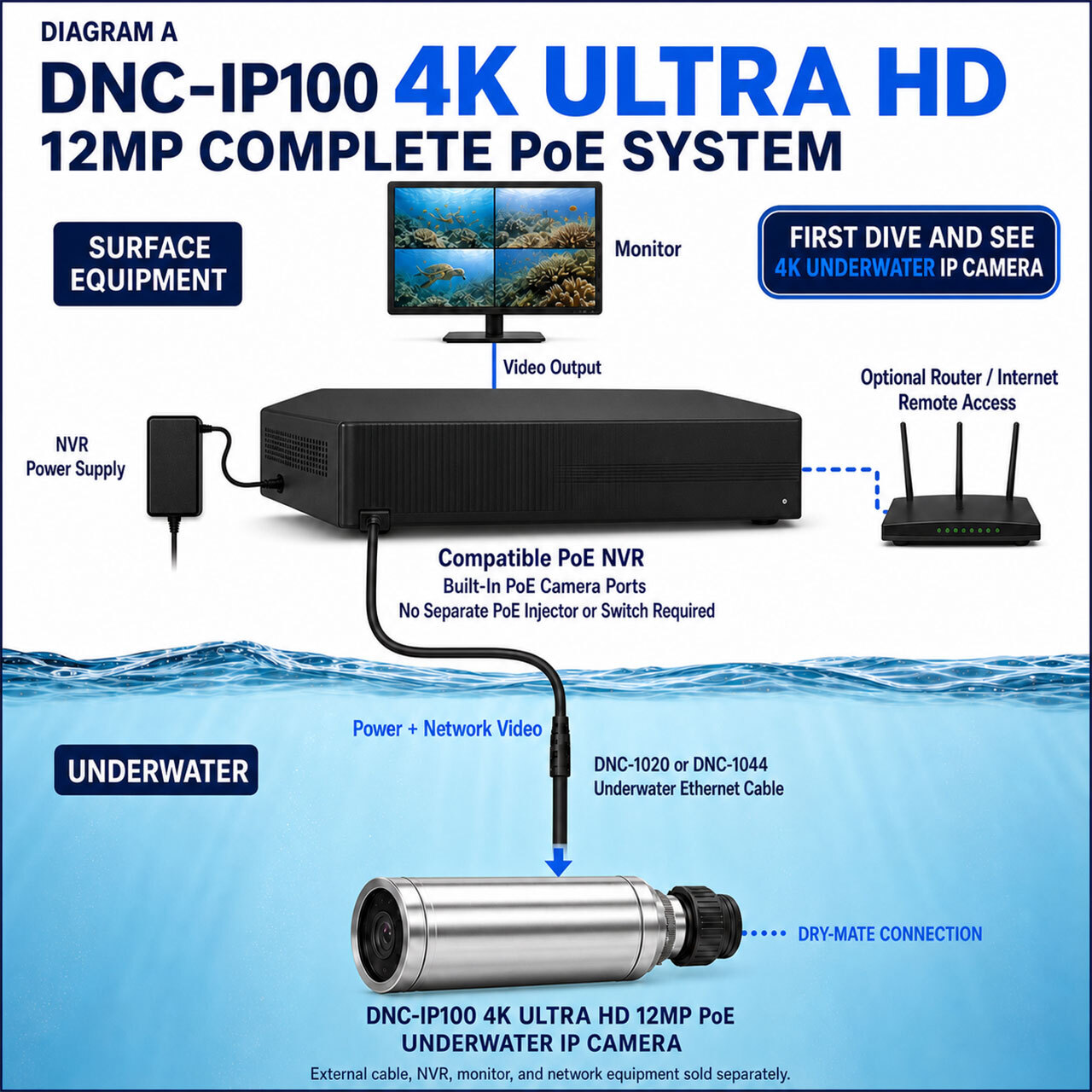
External underwater cable, PoE NVR, monitor, router, and other network equipment are sold separately unless specifically included with the selected product configuration.
How the DNC-IP100 4K PoE System Works
- Connect a compatible Dive And See underwater Ethernet cable to the DNC-IP100 while both connector halves are clean and completely dry.
- Connect the surface end of the Ethernet cable to a compatible PoE camera port on the NVR.
- Connect the NVR to its approved power supply and attach a compatible monitor to the appropriate NVR video output.
- Configure the camera resolution, recording, and network settings through the compatible NVR or approved network interface.
- For private local operation, leave the NVR LAN/WAN port physically disconnected. A router and Internet connection are optional and only needed when authorized remote access is specifically required.
Viewing the Camera in 4K
The DNC-IP100 produces a maximum image resolution of 4512 × 2512 pixels. To display 4K detail on the surface, the complete viewing path must support 4K, including the NVR video output, monitor, connecting video cable, and selected display settings.
If the camera is viewed on a 1080p monitor, the image will be scaled to the resolution available on that display. The camera still captures high-resolution video, but the monitor cannot physically display more pixels than its native resolution.
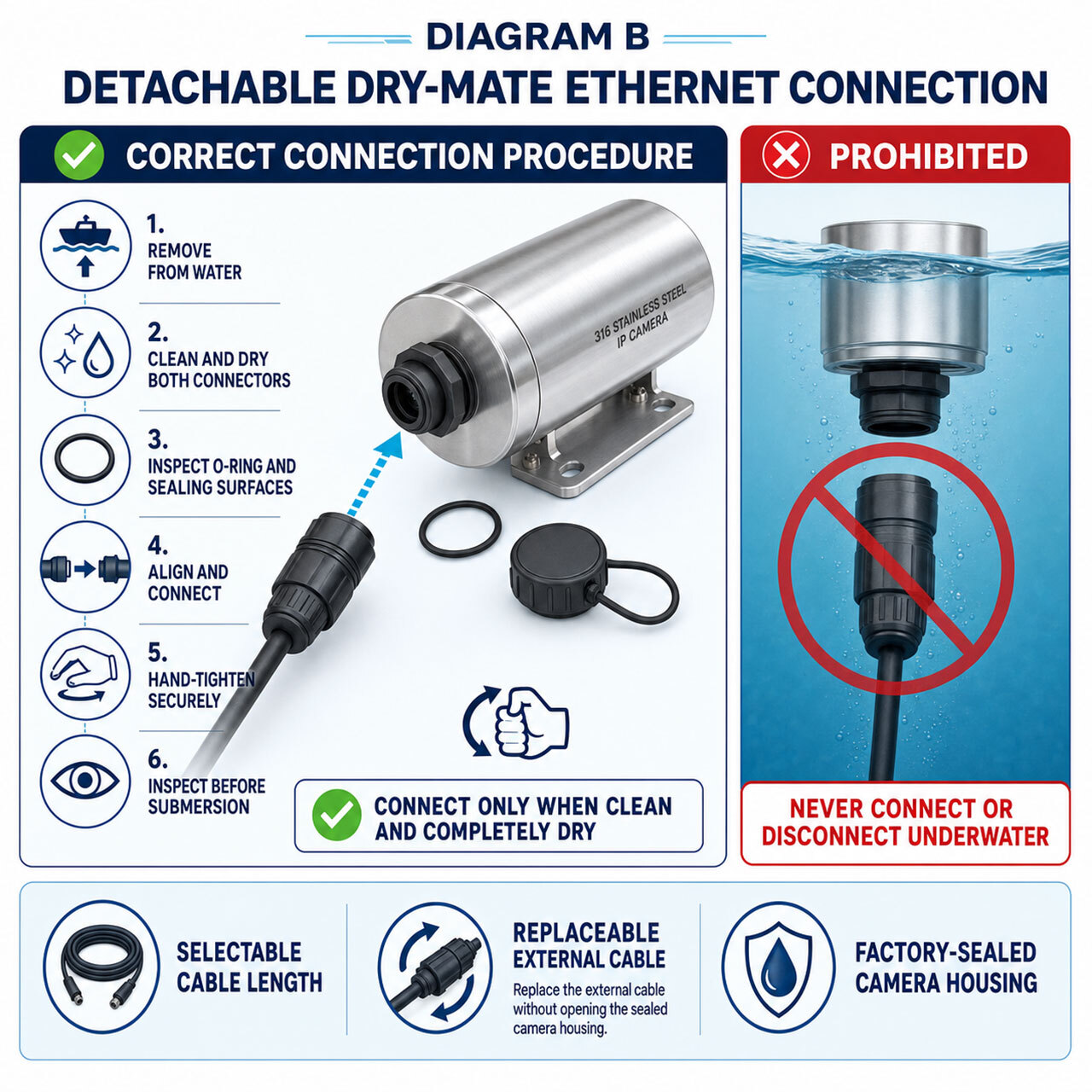
Detachable Dry-Mate Underwater Ethernet Connection
The detachable connection allows the camera and cable to be stored, transported, installed, serviced, and replaced independently. This provides greater flexibility than an underwater camera with a permanently attached tether.
Compatible Underwater Ethernet Cables
The DNC-IP100 is designed for use with selected Dive And See underwater Ethernet cable assemblies. Cable selection depends on the required operating distance, system configuration, connector arrangement, and available PoE power.
| Cable | Nominal Length | Typical Application |
|---|---|---|
| DNC-1020 | 100 ft / approximately 30 m | Tanks, pools, compact inspection systems, and shorter underwater deployments |
| DNC-1044 | 300 ft / approximately 90 m | Extended underwater monitoring, aquaculture, marine, and remote installations |
Verify the required cable length, PoE power budget, NVR compatibility, network equipment, and connector configuration before ordering. Custom cable configurations may be available for qualified projects.
Recommended External Underwater Lighting
Underwater 4K image quality depends on available light, water clarity, suspended particles, viewing distance, and water color. Additional illumination may be necessary in dark, deep, enclosed, or turbid environments.
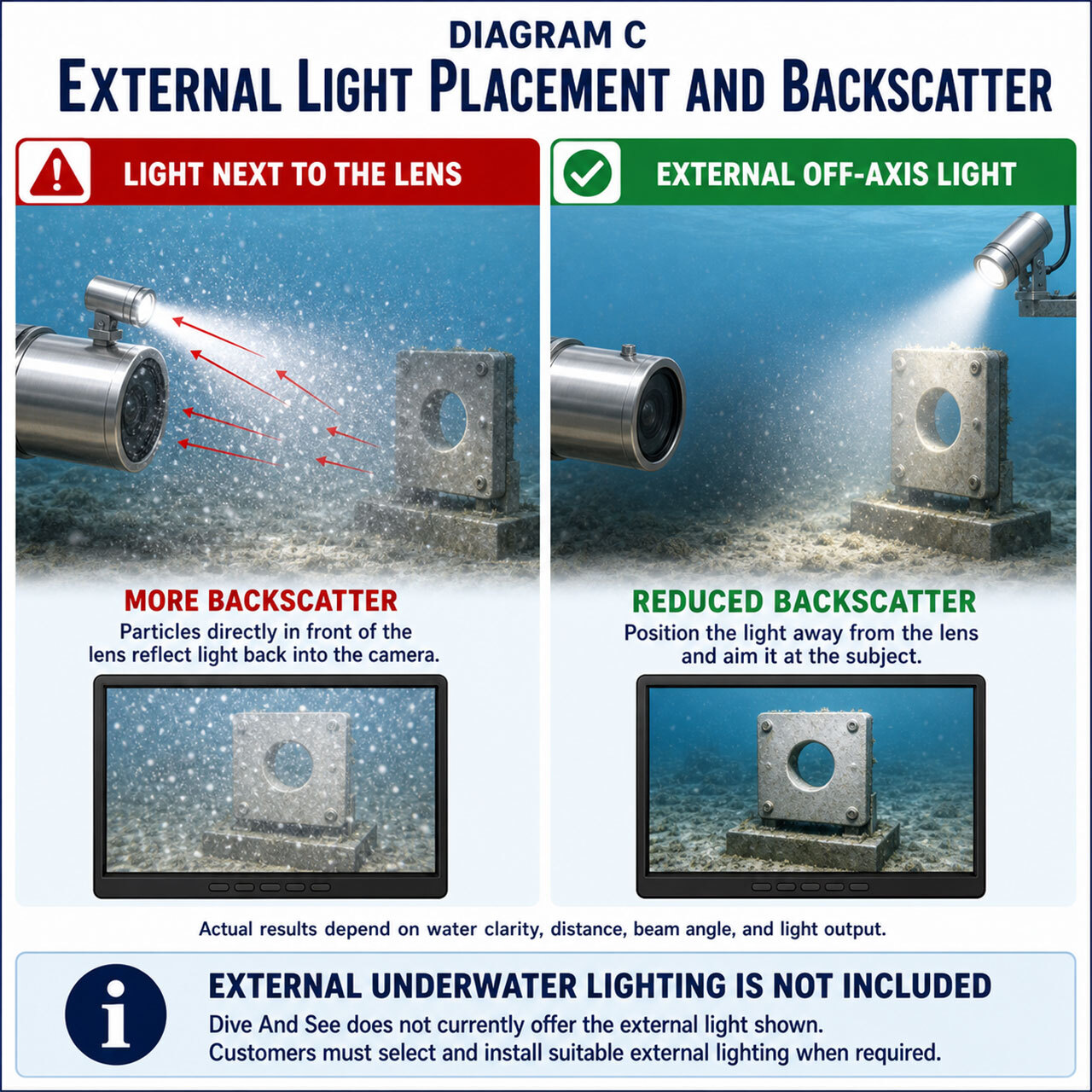
For better results, place the external underwater light away from the camera lens and aim it toward the observation area. Separating the light from the lens helps reduce backscatter caused by suspended particles reflecting light directly into the camera.
Designed for Separately Positioned External Lighting
The DNC-IP100 does not rely on a built-in white light or infrared illumination positioned immediately beside the camera lens. In many underwater environments, near-lens lighting can illuminate suspended particles directly in front of the camera and produce haze, glare, or backscatter.
Separately positioned external lighting gives the operator greater control over the light angle, distance, intensity, and direction. Infrared illumination is generally not an effective substitute for correctly positioned visible underwater lighting.
4K NVR Recording and Video Storage
The DNC-IP100 is designed for network-based viewing and recording through compatible surface equipment. Video storage is handled by the compatible NVR or other approved network recording system.
For 4K monitoring and playback, confirm that the selected NVR supports the camera resolution, video format, recording bandwidth, and 4K monitor output required by the application.
The sealed underwater camera housing is not intended to be routinely opened for access to removable memory. This keeps normal recording controls and storage equipment at the surface.
When an IP Camera Is the Better Choice
Dive And See offers underwater video solutions using IP, HDMI, and SDI. The best format depends on how the video must be distributed, viewed, recorded, and integrated.
| System Requirement | IP / PoE | HDMI | SDI |
|---|---|---|---|
| Power and video through one cable | Yes, with compatible PoE equipment | Normally separate power | Normally separate power |
| Direct NVR recording | Primary advantage | Requires additional recorder or converter | Requires compatible recorder |
| Multi-camera network integration | Well suited | Limited | Possible with additional equipment |
| Direct connection to a production monitor | Through NVR or decoder | Excellent | Excellent |
| Best suited for | Monitoring, recording, aquaculture, research, inspection, and networked installations | Direct display and camera-monitor systems | Professional live video and long cable production workflows |
This comparison is a general system-planning guide. Final performance depends on cable length, resolution, frame rate, recording equipment, converters, and the complete installation.
Technical Overview
| Product model | DNC-IP100 |
|---|---|
| Product category | Professional 4K underwater IP camera |
| Maximum image resolution | 4512 × 2512 pixels |
| Maximum image detail | Approximately 12 megapixels |
| Maximum frame rate | Up to 20 fps at maximum resolution |
| Power and communication | Power over Ethernet through a compatible underwater Ethernet cable |
| Housing material | 316 stainless steel |
| External connection | Detachable dry-mate underwater Ethernet connection |
| Recording | Compatible external NVR or approved network recording system |
| Internet requirement | Not required for local live view and local NVR recording |
| Private local configuration | Camera-to-NVR PoE connection with monitor attached locally and NVR LAN/WAN physically disconnected |
| Internal removable storage | Not intended for customer-accessible removable memory |
| Built-in underwater lighting | Not included; use separately positioned external lighting when required |
| Compatible Dive And See cables | Selected DNC-1020 and DNC-1044 configurations |
Product specifications and compatible configurations are subject to confirmation before final system integration. Contact Dive And See when selecting an NVR, cable, monitor, or custom installation configuration.
Standard Camera Configuration
Included
- DNC-IP100 4K Ultra HD 12MP PoE underwater IP camera
- 316 stainless steel underwater camera housing
- Installed dry-mate Ethernet connection
Sold Separately
- DNC-1020 or DNC-1044 underwater Ethernet cable
- Compatible PoE NVR and NVR power supply
- 4K-capable monitor and video cable
- Router and Internet service, only when optional remote access is required
- External underwater lighting
- Mounting hardware and custom installation accessories
Always confirm the exact contents shown in the selected product option or quotation. Custom system packages may include additional equipment.
Important Installation and Maintenance Notes
- Never mate or disconnect the dry-mate connector underwater.
- Inspect the connector, sealing surfaces, cable, and camera housing before every deployment.
- Make sure the connector is clean, dry, correctly aligned, and fully secured before submersion.
- Do not use pliers or excessive force on connector coupling components.
- Use the appropriate protective caps whenever the cable and camera are disconnected.
- After saltwater exposure, rinse the camera exterior and cable connector exterior with clean fresh water and dry them before storage.
- Do not open the sealed camera housing unless specifically authorized by Dive And See.
- Confirm NVR compatibility, supported camera resolution, PoE capability, cable length, and system power requirements before operation.
Information to Provide Before Ordering
To help Dive And See recommend the correct system configuration, include the following information with your inquiry:
- Application and type of underwater environment
- Required operating depth and approximate viewing distance
- Required underwater Ethernet cable length
- Number of cameras and expected recording duration
- Preferred local-only or authorized remote-access configuration
- Existing NVR, monitor, router, or network equipment, if already selected
Frequently Asked Questions
Does the DNC-IP100 require an Internet connection?
No. Internet access is not required for local camera power, live viewing, or NVR recording. A compatible PoE NVR, its power supply, a locally connected monitor, and the underwater camera system are sufficient for normal local operation.
How can the underwater camera system be isolated from the Internet?
Connect each DNC-IP100 camera directly to a compatible PoE NVR and connect the monitor directly to the NVR. Leave the NVR LAN/WAN port physically disconnected from routers and other Internet-connected equipment.
In this configuration, live video and recordings stay within the local camera-and-NVR system. Remote viewing is unavailable until an authorized network connection is deliberately added.
Does local-only operation guarantee complete cybersecurity?
Physical network isolation greatly reduces external network exposure, but no product should be described as absolutely secure. Overall security also depends on passwords, physical access, approved configuration, storage protection, firmware maintenance, and the security of any equipment later connected to the system.
Is the DNC-IP100 a 4K underwater camera?
Yes. The DNC-IP100 produces a maximum image resolution of 4512 × 2512 pixels, which contains more image pixels than standard 4K UHD resolution of 3840 × 2160.
To display 4K detail on the surface, the NVR output, monitor, video cable, and selected display settings must support 4K.
What happens when the camera is viewed on a 1080p monitor?
The image will be scaled to the monitor’s available resolution. The camera can still capture high-resolution video, but a 1080p display cannot physically show the full pixel detail available from the camera.
Can the DNC-IP100 connect directly to a PoE NVR?
Yes. The intended configuration connects the camera directly to a compatible PoE camera port on the NVR. A separate PoE injector or Ethernet switch is not required in this configuration.
Is the underwater Ethernet cable included?
The external underwater Ethernet cable is sold separately unless the selected product option or quotation specifically includes it. Compatible cable choices include selected DNC-1020 and DNC-1044 configurations.
Can the cable be disconnected underwater?
No. The connector is dry-mate, not wet-mate. It must only be connected or disconnected when both connector halves are outside the water, clean, and completely dry.
Does the camera include an underwater light?
No. External underwater lighting is not included. When additional illumination is required, the customer should install a suitable light away from the camera lens and aim it toward the observation area.
Why is separately positioned external lighting recommended?
Moving the light away from the lens can reduce reflections from suspended particles and improve underwater contrast. The ideal position depends on water clarity, viewing distance, light intensity, and the subject.
Does the DNC-IP100 require an underwater battery?
No underwater battery is required during normal PoE operation. Electrical power is supplied from compatible surface equipment through the underwater Ethernet cable.
Where is the 4K underwater video recorded?
Video is normally viewed and recorded using a compatible surface NVR or approved network recording system. Confirm available storage capacity and recording bandwidth when planning continuous high-resolution recording.
Can Dive And See help configure a complete 4K underwater camera system?
Yes. Contact Dive And See for assistance selecting the camera, underwater Ethernet cable, compatible recording equipment, 4K monitor, and accessories for your application.
Planning an Underwater IP Camera Project?
Send us your application, required depth, cable length, number of cameras, and preferred recording configuration. Dive And See can help review the camera, cable, NVR, monitor, and installation requirements before you order.
Discuss Your Project