
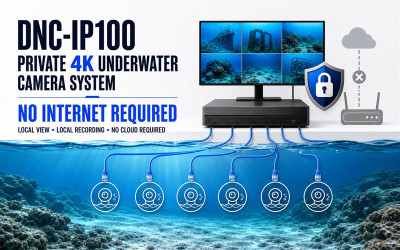
How to Build a Private 4K Underwater Camera System Without Internet
Jul 19th 2026
How to Build a Private 4K Underwater Camera System Without Internet
A local PoE underwater camera system can provide high-resolution live viewing and continuous recording without sending sensitive video to the cloud or requiring an Internet connection.
Does an IP Camera Have to Be Connected to the Internet?
No. The term IP camera means that the camera communicates using Internet Protocol networking. It does not mean that the camera must be connected to the public Internet or a cloud service.
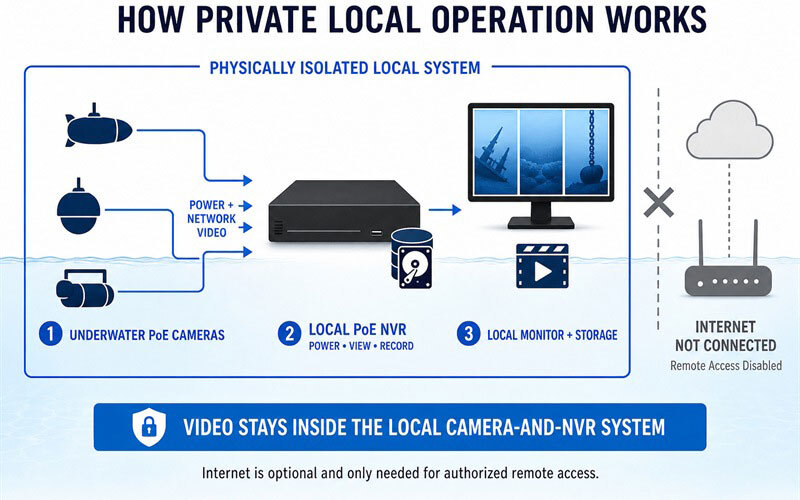
An underwater IP camera can operate entirely inside a closed local Ethernet network. In a simple configuration, the camera connects directly to a compatible Power over Ethernet NVR. The NVR provides camera power, receives video, records footage to local storage, and displays the live image on a directly connected monitor.
Local Live View and Recording—No Internet Required
For a physically isolated installation, connect the underwater cameras to the PoE camera ports on the NVR, connect a monitor directly to the NVR, and leave the NVR LAN/WAN port disconnected from routers and other Internet-connected equipment.
With no Internet route, the system continues providing local camera power, live video, playback, and recording. Remote access is unavailable until an authorized network connection is deliberately added.
What Equipment Is Required?
- One or more underwater PoE IP cameras. The DNC-IP100 is designed for 4K Ultra HD underwater video with up to 12MP image detail.
- Compatible underwater Ethernet cables. Each camera requires its own cable connection to the surface equipment.
- A compatible multi-camera PoE NVR. The NVR supplies PoE power, receives video, manages cameras, and records footage locally.
- An NVR power supply. The power system must support the NVR and the connected PoE camera load.
- A locally connected monitor. A 4K-capable monitor and NVR output are recommended when viewing 4K video.
Why Use Power over Ethernet Underwater?
Power over Ethernet allows electrical power and network video to travel through the same compatible cable. This can simplify an underwater camera installation because the submerged camera does not need a separate battery or an additional underwater power cable during normal operation.
A direct camera-to-NVR PoE connection also removes the need for a separate PoE injector or Ethernet switch when the selected NVR already provides compatible built-in PoE camera ports.
One NVR Can Manage Multiple Underwater Cameras
A multi-camera NVR allows operators to view several underwater areas from one surface station. Cameras can be positioned in different tanks, around an aquaculture facility, near submerged equipment, or at multiple inspection points.
The monitor can display a multi-camera grid for simultaneous observation. An operator can also select one camera for a larger live image, review locally recorded video, or configure individual recording schedules.
The exact number of supported cameras, recording resolution, playback channels, storage duration, and PoE power budget depends on the selected NVR and complete system configuration.
Local Operation vs. Remote Access
| Feature | Local-Only System | Internet-Connected System |
|---|---|---|
| Live monitor view | Yes | Yes |
| Local NVR recording | Yes | Yes |
| Cloud service required | No | Depends on configuration |
| Remote viewing | No | Optional |
| External network exposure | Reduced through physical isolation | Requires network-security controls |
Applications for a Private Underwater Camera Network
- Aquaculture and fish behavior monitoring
- Research laboratories and controlled experiments
- Industrial tank and submerged equipment inspection
- Water treatment and reservoir monitoring
- Aquariums and hatcheries
- Marine facilities and underwater infrastructure
- Projects containing sensitive or proprietary visual information
Important Security Considerations
Physical network isolation greatly reduces external network exposure, but no camera system should be described as absolutely secure. Security depends on the entire installation and its operating procedures.
- Leave the NVR LAN/WAN port physically disconnected when remote access is not required.
- Use strong, unique local administrator passwords.
- Restrict physical access to the NVR and recorded storage.
- Use approved firmware and maintain equipment according to the system provider's instructions.
- Document any later connection to routers, computers, or external networks.
The DNC-IP100 4K PoE Underwater IP Camera
The DNC-IP100 is being developed as Dive And See's first 4K Ultra HD underwater IP camera. The planned system combines up to 12MP image detail, Power over Ethernet, a 316 stainless steel underwater enclosure, and a detachable dry-mate Ethernet connection.
Selected configurations can use Dive And See DNC-1020 and DNC-1044 underwater Ethernet cables. The camera, compatible cable, NVR, monitor, storage, and lighting should be selected as one complete engineered system.
Explore the DNC-IP100 4K Underwater IP CameraFrequently Asked Questions
Can a PoE underwater camera work without Internet?
Yes. A compatible PoE NVR can power the camera, receive video, display the live image, and record footage locally without an Internet connection.
Is a router required?
A router is not required for a direct local camera-to-NVR system. It is only needed when authorized network integration or remote access is required.
Can multiple underwater cameras use one NVR?
Yes, when the NVR provides sufficient compatible camera channels, PoE ports, power capacity, decoding performance, bandwidth, and recording storage.
Does local-only operation guarantee complete security?
No system can guarantee absolute security. Physical isolation reduces external network exposure, while passwords, physical security, storage protection, configuration, and maintenance remain important.