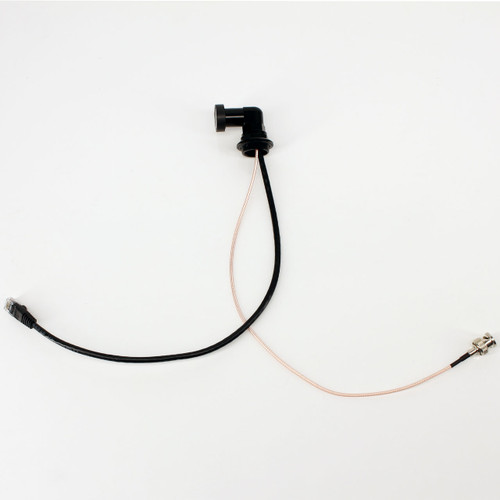


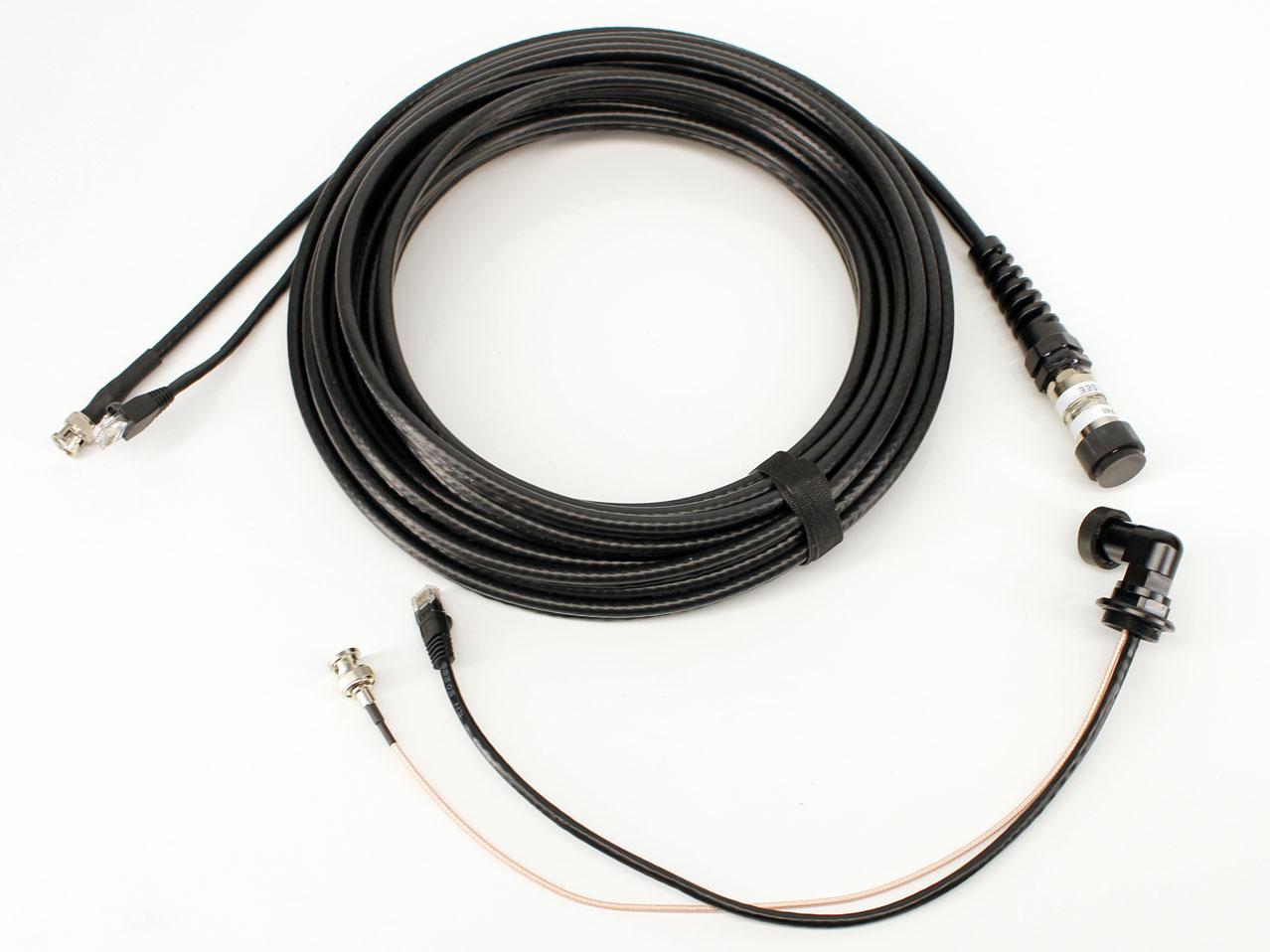
The DNC-2133 M24x1 Underwater Ethernet and 3G-SDI Bulkhead Connector combines Gigabit Ethernet communication and live SDI video in one compact, rotatable 90-degree housing interface.
Inside the housing, separate Cat6/RJ45 and coaxial/BNC leads connect to a compatible camera or electronic device. Outside the housing, the DNC-2133 connects to a compatible Dive And See Ethernet/SDI combo cable, providing network control, configuration, file transfer, streaming, and a separate SDI video path between submerged equipment and the surface.
Two signal paths through one M24 port
Cat6 Ethernet with an internal RJ45 connector plus a separate coaxial SDI channel with an internal BNC connector. The low-profile swivel elbow routes the external cable alongside the housing instead of straight out.
Key Features
- Ethernet and SDI in one bulkhead: Carries network communication and a separate live-video signal through one M24 housing port.
- Gigabit Ethernet: Supports compatible camera control, settings, file transfer, browser access, and network streaming.
- 3G-SDI live video: Provides a dedicated SDI path for compatible monitoring and recording equipment.
- Internal RJ45 and BNC: Cat6 Ethernet terminates in RJ45, while the coaxial video channel terminates in BNC inside the housing.
- Rotatable 90-degree design: Allows the external connector direction to be adjusted for cable routing and available housing clearance.
- Low-profile cable routing: Keeps the external cable closer to the housing rather than projecting vertically outward.
- Triple O-ring swivel seal: The rotating section uses a triple O-ring sealing system.
- M24x1 short thread: Designed for compatible Nauticam and similar M24 housing ports.
- 160 m depth rating: Rated to 240 PSI / 160 m (525 ft).
- Built-in Water Block: Helps maintain housing vacuum and limit water migration after external cable damage.
How the DNC-2133 Works
- Install the DNC-2133 in a compatible M24x1 housing port.
- Connect the internal RJ45 lead to the compatible Ethernet port on the camera or device.
- Connect the internal BNC lead to the compatible SDI output.
- Rotate the external elbow to the required cable-routing direction before final deployment.
- Connect a compatible Dive And See underwater Ethernet/SDI combo cable to the external connector.
- At the surface, connect Ethernet to the network/control system and SDI to the monitor, recorder, switcher, or converter.
- Test network communication, SDI video, vacuum integrity, and waterproof sealing before submerging the housing.
Ethernet Camera Control and Networking
The Cat6 channel is intended for compatible Gigabit Ethernet applications. Depending on the connected camera and software, Ethernet may support remote settings, camera control, browser access, live streaming, metadata, monitoring, and file transfer.
Available functions depend on the camera model, firmware, network protocol, software, addressing, bandwidth, and system configuration. Confirm the required functions with the camera manufacturer before ordering.
Separate SDI Video Channel
The coaxial channel carries an SDI video signal independently from the Ethernet connection. This allows an operator to use Ethernet for camera communication while sending live SDI video to a surface monitor, recorder, switcher, converter, or other compatible production equipment.
Rotatable 90-Degree Elbow Design
The swivel elbow allows the external cable to be positioned in the most practical direction for the housing, camera rig, or underwater installation. The 90-degree form reduces outward projection and can improve cable routing in tight or streamlined configurations.
The rotatable section uses a triple O-ring sealing system. Rotation is for installation positioning and cable routing; follow the product instructions and do not force or repeatedly rotate the connector under load.
Built-In Water Block
The DNC-2133 includes a built-in Water Block designed to help maintain vacuum integrity when the housing is used with an AirLock-type vacuum system. It also helps limit water migration toward the housing interior if the external cable or cable-to-bulkhead connection is damaged.
The Water Block is an additional protective feature and does not replace correct installation, O-ring inspection, tightening, strain relief, vacuum testing, pressure testing, or routine maintenance.
Technical Specifications
| Model | DNC-2133 |
|---|---|
| Product type | Underwater Ethernet and SDI combo bulkhead connector |
| Design | Rotatable 90-degree elbow / low-profile |
| Housing interface | M24x1 short thread |
| Ethernet channel | Cat6 / compatible Gigabit Ethernet |
| Internal Ethernet connector | RJ45 |
| Video channel | Separate coaxial SDI channel |
| Internal SDI connector | BNC |
| Swivel sealing | Triple O-ring system |
| Depth rating | 240 PSI / 160 m (525 ft) |
| Water protection | Built-in Water Block |
| Compatible cables | DNC-1038 and DNC-1041 in compatible Ethernet/SDI configurations |
| Custom options | Custom internal cable length or termination may be available upon request |
Compatibility with DNC-1038 and DNC-1041
The DNC-2133 is compatible with the DNC-1038 underwater Ethernet and SDI combo cable and the DNC-1041 underwater multi-signal Cat5e and 3G-SDI cable when the cable pinout and connector configuration match the bulkhead.
The standard DNC-2133 uses an internal RJ45 Ethernet termination. When DNC-1041 is connected in its standard Ethernet configuration, its four twisted pairs can carry Ethernet through the DNC-2133 while the separate coaxial channel carries SDI video.
Custom DNC-1041 wiring notice
If the eight DNC-1041 conductors are reassigned to custom power, data, control, trigger, telemetry, or sensor functions, do not connect that custom pinout to the standard DNC-2133 RJ45 or ordinary Ethernet equipment. Request a compatible custom DNC-2133 termination and verify the complete pinout before applying power.
Camera Applications
- Z CAM underwater housings and compatible network-controlled cameras
- RED and other compatible professional cinema-camera systems
- Remote camera settings, browser control, and file transfer over Ethernet
- Gigabit Ethernet live-streaming workflows
- Simultaneous SDI monitoring or recording at the surface
- ROVs, underwater robotics, research, inspection, and remote monitoring systems
M24x1 Outline Dimensions
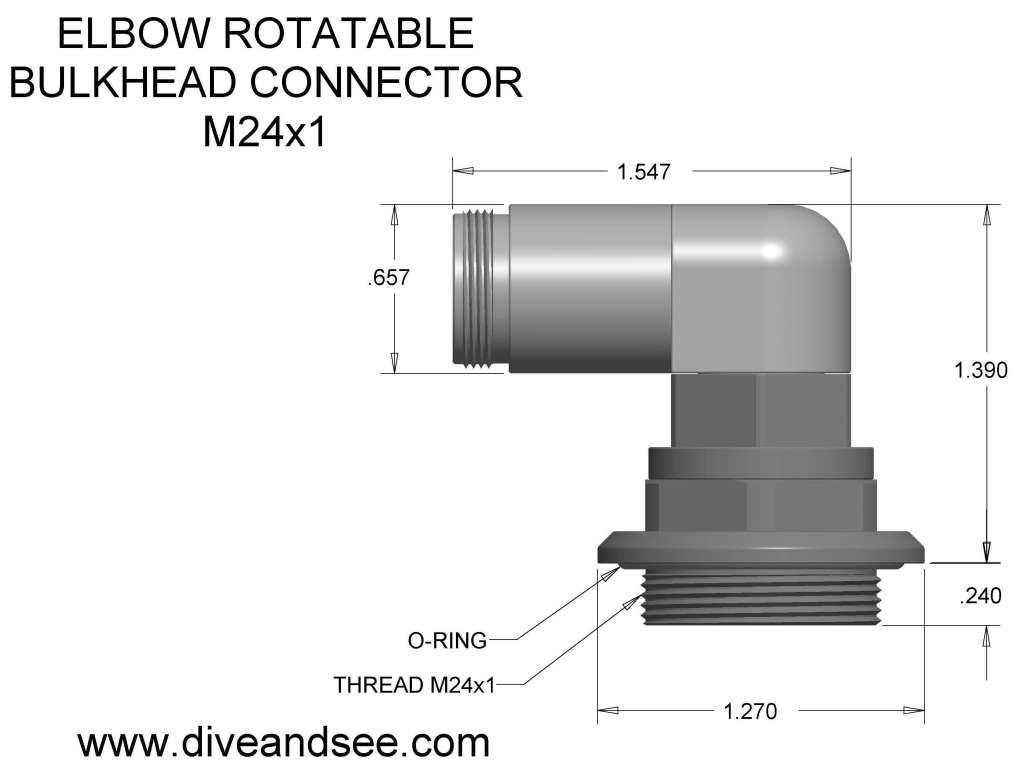
The standard DNC-2133 uses an M24x1 short-thread configuration for compatible Nauticam and similar underwater housings. Confirm the exact thread pitch, usable thread length, sealing surface, housing wall thickness, external clearance, and internal clearance before ordering.
Frequently Asked Questions
Can Ethernet and SDI be used simultaneously?
Yes. The DNC-2133 provides a Cat6 Ethernet channel and a separate coaxial SDI channel, allowing network communication and SDI video to operate at the same time with compatible equipment.
What connectors are inside the housing?
The standard internal leads terminate in an RJ45 connector for Ethernet and a BNC connector for SDI.
Why use a rotatable 90-degree connector?
The swivel elbow lets the installer direct the external cable along the housing, improving routing and reducing outward projection in tight setups.
Can DNC-2133 be used with DNC-1041?
Yes, when DNC-1041 is configured for compatible Ethernet and SDI wiring. If the DNC-1041 twisted pairs are reassigned to custom signals, a custom DNC-2133 termination and verified pinout may be required.
Can the Ethernet connection provide PoE?
It may be used in a compatible PoE system when the complete cable, pinout, connector contacts, power source, voltage drop, and underwater device are designed and tested for the required PoE standard and cable length.
Will DNC-2133 fit every M24 housing?
No. Confirm M24x1 thread pitch, usable thread length, sealing geometry, housing-wall dimensions, and internal and external clearance before ordering.
Related Products and Categories
- DNC-1041 underwater multi-signal Cat5e and 3G-SDI cable
- DNC-1038 underwater Ethernet and SDI combo cable
- Underwater combo bulkhead connectors
- Underwater combo cables
Important Installation Instructions
- Confirm the exact M24x1 housing interface and clearance before installation.
- Inspect the triple O-ring swivel seals, housing seal, connector body, cable, and coupling surfaces before every deployment.
- Position the swivel elbow before deployment and do not force rotation under cable tension.
- Fully tighten the external waterproof cable coupling nut by hand. Do not use pliers unless specifically required by the connector instructions.
- Provide suitable external cable strain relief.
- Never connect custom power or control wiring to an RJ45 Ethernet port until the complete pinout has been verified.
- Test Ethernet, SDI video, PoE or custom power if used, vacuum integrity, and waterproof sealing before submerging the housing.
Compatibility notice: Submit the housing model, camera, M24 port specification, cable model, Ethernet or custom pinout, SDI format, cable length, and operating depth before requesting a custom DNC-2133 configuration.