DNC-1030 Underwater USB-C / USB-A Tethering Cable – 30m Fiber-Optic Cable for High-Speed Camera Control and Data Transfer
Professional Underwater USB Tethering Cable for Remote Camera Control, Live View, and High-Speed File Transfer
The DNC-1030 is a professional 30-meter underwater USB fiber-optic tethering cable designed to connect a camera inside an underwater housing to a surface laptop or computer. It supports professional workflows such as remote camera control, live view, tethered shooting, file transfer, focus checking, and surface-based camera operation.
This cable is ideal for underwater photographers, production teams, marine researchers, inspection operators, aquarium filming setups, and controlled pool-shoot environments where the camera must stay underwater while the operator works from the surface.
Why Choose the DNC-1030?
Standard USB cables are not designed for long underwater-to-surface tethering runs. Distance, signal loss, connector interruptions, and unstable communication can cause the camera to disconnect from the computer. The DNC-1030 uses a fiber-optic USB extension design to help maintain stable high-speed communication over a 30-meter cable length.
- 30m / 100ft underwater-to-surface tethering for professional camera workflows
- Fiber-optic USB technology for long-distance high-speed data transfer
- Supports live view and remote camera control when used with compatible cameras and software
- Designed for RAW photo transfer, file review, focus checking, and tethered shooting
- Works with compatible waterproof USB bulkhead connectors for underwater camera housings
- Built for underwater environments with waterproof connectors and durable construction
How It Works
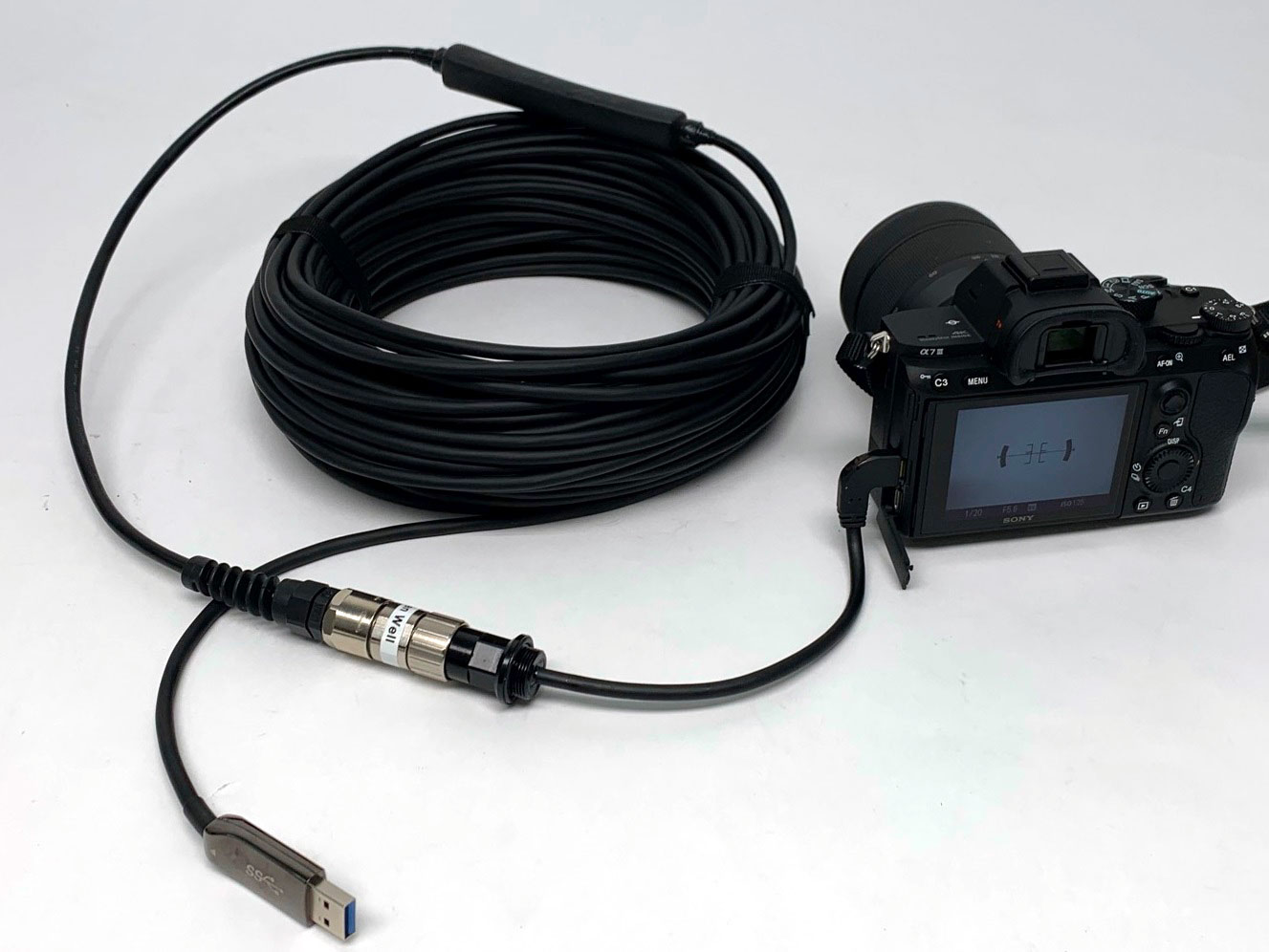
The camera is installed inside the underwater housing and connected internally to a compatible USB bulkhead connector. The DNC-1030 connects to the waterproof bulkhead on the outside of the housing and runs to the surface computer. From the surface, the operator can use compatible tethering software to control the camera, check live view, adjust settings, and transfer files.
Workflow: Camera inside underwater housing → USB bulkhead connector → DNC-1030 fiber-optic tethering cable → Surface laptop or computer → Live view, remote camera control, and high-speed file transfer.
Diagram A – Underwater USB Tethering Workflow
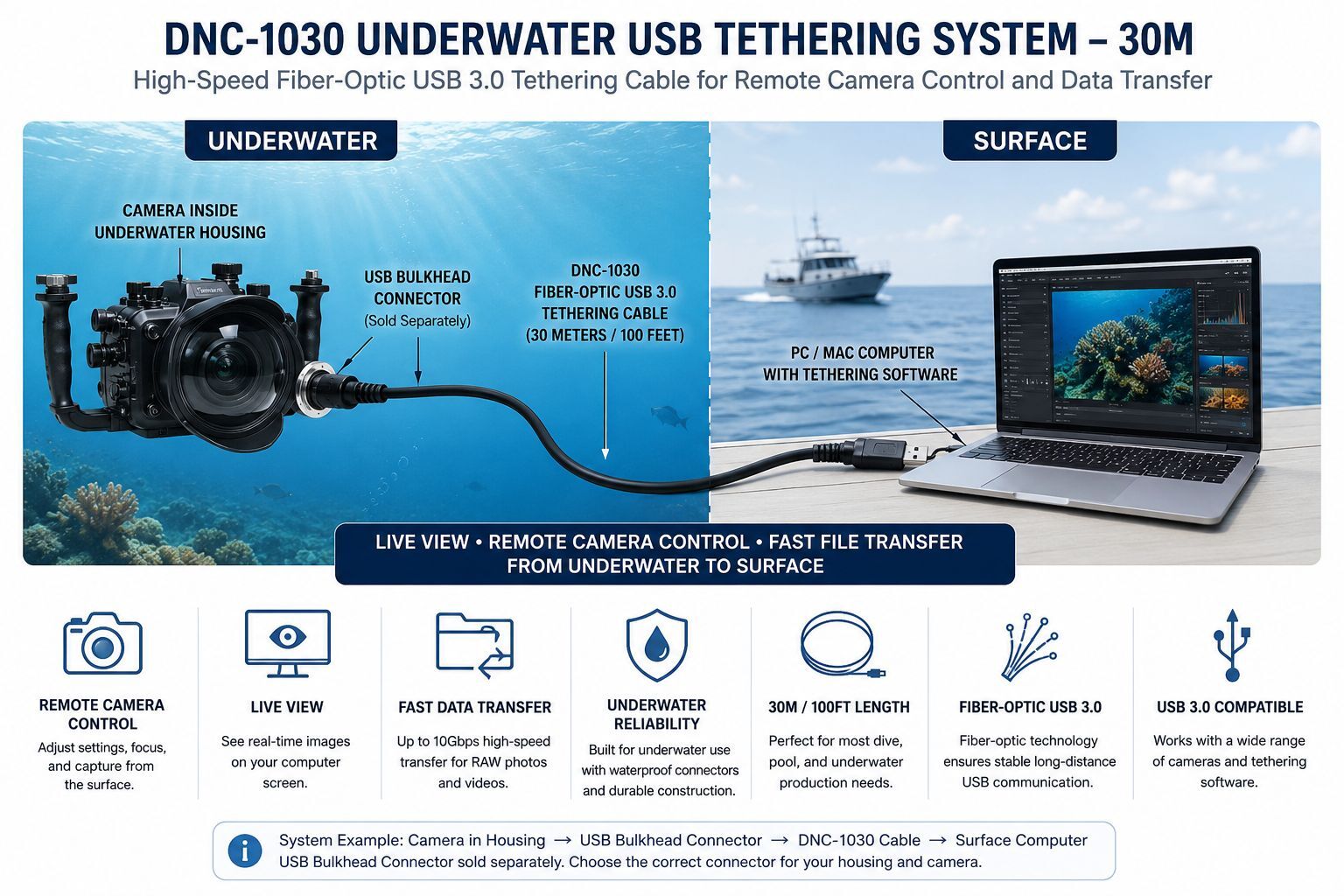
This diagram shows a typical DNC-1030 underwater USB tethering workflow: a camera inside an underwater housing connects through a waterproof USB bulkhead connector to the 30m fiber-optic tethering cable, allowing a surface computer to support live view, remote camera control, and high-speed file transfer.
Remote Shooting from a PC or Mac
After connecting the camera to a PC or Mac through the DNC-1030 tethering cable and a compatible waterproof USB bulkhead, the operator can use camera-supported software for remote shooting. Depending on the camera model, this may include live view, exposure control, focus adjustment, image review, and file transfer.
Composition Adjustment
With supported software, the operator can check composition on the surface computer using live view, grid lines, guide overlays, and enlarged preview options. This is especially useful for pool photography, aquarium filming, product testing, and controlled underwater studio work.
Focus Adjustment
For compatible cameras, remote software can help with focus checking, magnified display, and precise composition before capture. This allows the surface operator to fine-tune the shot without removing the camera from the housing.
Compatible Camera Software
The DNC-1030 can support professional tethering and remote-control workflows when the camera, computer, operating system, and software support USB tethering.
- Canon EOS Utility
- Sony Imaging Edge Desktop
- Nikon NX Tether
- Capture One tethering workflows
- Other camera manufacturer USB control or file-transfer software
Important: USB tethering capability depends on the camera model, firmware, computer, operating system, tethering software, and full USB system configuration. Some cameras support full remote control and live view, while others may support file transfer only.
Key Features
- Length: 30 meters / approximately 100 feet
- High-speed USB tethering: Designed for professional photo and video data workflows
- Fiber-optic USB technology: Helps maintain stable long-distance USB communication
- Underwater-ready design: Built for underwater camera housing applications
- Remote camera operation: Supports compatible live view, file transfer, and control workflows
- Durable construction: PVC jacket with waterproof connector system
- Professional ecosystem: Works with compatible Dive And See USB bulkhead connectors
Technical Specifications
- Cable length: 30 meters / 100 feet
- USB type: USB 3.x fiber-optic tethering cable design
- Data transfer: High-speed USB data transfer depending on camera, host computer, software, and full system configuration
- Depth rating: 28 meters
- Pulling tension: Up to 20 lb
- Connector material: Nickel-plated marine-grade brass
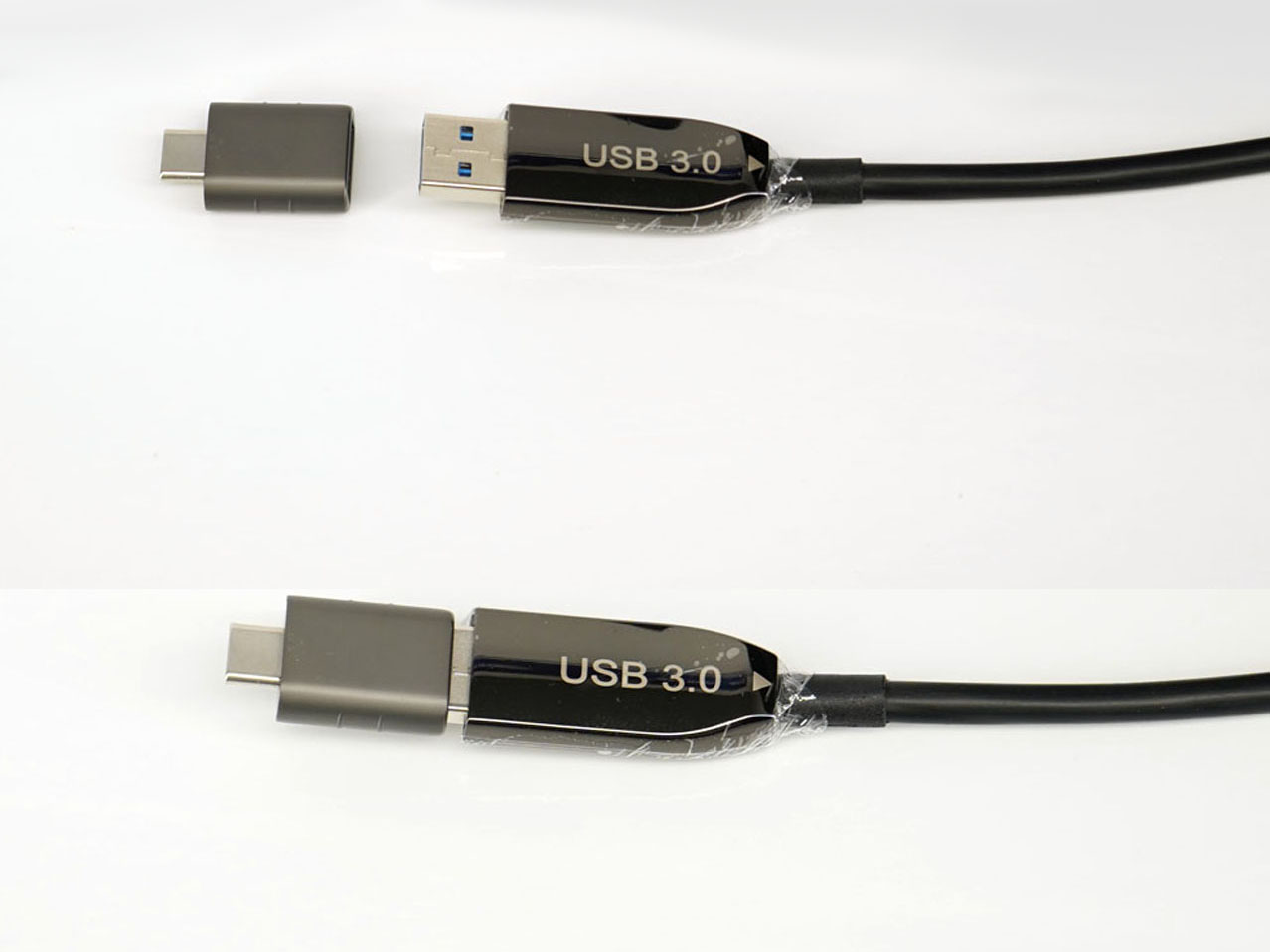
- Connector type: Waterproof underwater connector on one end, surface USB connection on the other end
- Typical use: Underwater camera tethering, remote camera control, live view, file transfer, RAW image transfer, and surface operation
Compatible Bulkhead Connector Ecosystem
The DNC-1030 is designed to work with compatible Dive And See waterproof USB bulkhead connectors. The correct bulkhead depends on the housing brand, thread size, camera connector type, and internal cable clearance.
DNC-2059 – USB-C underwater bulkhead connector for Ikelite, Aquatica, and Aquatech housings
DNC-2157 – M24 USB-C bulkhead connector for ZED 2i Stereo Camera and similar systems
DNC-2168 – M14 USB 3.1 Type-C bulkhead connector for Nauticam Canon 1DX II housing
DNC-2061 – M16 short-thread USB-C bulkhead connector for Nauticam housings
DNC-2043 – Underwater SuperSpeed USB 3.0 Micro-B bulkhead connector
DNC-2049 – Micro USB right-angle bulkhead connector for Nauticam A7RII housing
DNC-2096 – M24 USB-C bulkhead connector for Nauticam housings
DNC-2173 - 1/2-20 thread USB-C for Ikelite housings
The USB bulkhead connector is sold separately so the correct configuration can be matched to your housing, camera, and internal connector layout.
Why Standard USB Cables Are Not Enough for Underwater Tethering
Regular USB cables are usually limited by cable length and are not designed for long underwater-to-surface setups. In underwater camera systems, the signal must pass through internal camera cables, a waterproof bulkhead, an external underwater cable, and a surface connection. Each transition can affect reliability.
The DNC-1030 is built for this type of long-distance tethering application, where stable connection and high-speed data transfer are more important than a simple short USB extension.
Applications
- Underwater photography: Camera control and image transfer from a surface computer
- Pool photography: Controlled tethered shooting for commercial, sport, and creative projects
- Aquarium filming: Surface-based control for cameras inside underwater housings
- Marine research: Remote camera operation and image collection in controlled underwater environments
- Inspection documentation: File transfer and camera control for underwater inspection setups
- Studio-style underwater shoots: Live view, focus checking, and tethered capture workflows
- Camera testing: Surface computer access while the camera remains sealed inside the housing
Custom Options
Dive And See can help configure the DNC-1030 system for different underwater housings, camera models, connector types, and installation requirements. Custom configurations may be available depending on the required bulkhead, internal cable, external connector, and surface-side USB connection.
If you are not sure which bulkhead connector is correct, contact Dive And See with your camera model, housing model, USB connector type, and required cable length.
Important Tightening Warning
Before placing the system underwater, always verify that the external waterproof connector coupling nut is fully tightened by hand. Do not use pliers. A loose connector can allow water to enter the connection area and may cause cable, connector, camera, or housing damage.
Troubleshooting Tips
- Computer does not recognize the camera: Restart the tethering software, reconnect the cable, and confirm that the camera is set to the correct USB mode.
- Live view is not available: Confirm that the camera model and software support live view over USB.
- Slow or unstable transfer: Check camera settings, USB mode, computer port, software compatibility, and all connector seating points.
- Cable removal: When removing the cable, avoid sharp pulling at the connector. Create a relaxed loop to reduce stress on the joint.
FAQ
Can I use the DNC-1030 for underwater camera tethering?
Yes. The DNC-1030 is designed for underwater camera tethering between a camera inside an underwater housing and a surface computer when used with a compatible waterproof USB bulkhead connector.
Can it support live view?
Yes, if the camera and tethering software support live view over USB. Many professional Canon, Sony, and Nikon cameras support live view or remote-control workflows through manufacturer software.
Why use fiber-optic USB instead of a regular USB cable?
Fiber-optic USB helps maintain stable long-distance communication. Regular USB cables are limited by distance and may become unreliable over long underwater-to-surface runs.
Does it work with Capture One?
The cable can be used as part of a Capture One tethering workflow if the camera model is supported by Capture One and the complete USB connection is recognized by the computer.
Can it transfer RAW files?
Yes. The cable can support high-speed file transfer, including RAW files, when the camera, computer, and software support that workflow.
Is the bulkhead connector included?
The compatible USB bulkhead connector is typically selected separately because every underwater housing may require a different thread size, internal connector type, and cable orientation.
Can this cable be customized?
Custom configurations may be available depending on the required connector type, housing, camera, and application. Contact Dive And See before ordering if your setup requires a specific bulkhead or connector layout.
Product Images