

DNC-GP16 GoPro HERO13 Underwater HDMI Live View System with External Power
Professional underwater GoPro live-view housing system designed for real-time HDMI monitoring, continuous external power, integrated LED lighting, underwater inspection, pool monitoring, aquaculture, marine research, and live streaming applications.
Overview
External Power + HDMI Live View for GoPro HERO Cameras
The DNC-GP16 is a professional underwater GoPro housing system designed for HDMI live view, surface monitoring, long-duration filming, underwater inspection, and live streaming. It allows the GoPro image to be viewed at the surface in real time while external power supports extended underwater operation.
Unlike a standard GoPro dive housing that is mainly designed for internal recording, the DNC-GP16 is built as a complete underwater monitoring system. It routes HDMI video and external power through underwater cables, allowing operators to view, record, stream, and monitor underwater activity from above the surface.
This system is especially useful for boat inspections, dock inspections, aquarium monitoring, pool monitoring, marine research, underwater education, dive shop demonstrations, search and recovery, and underwater live streaming.
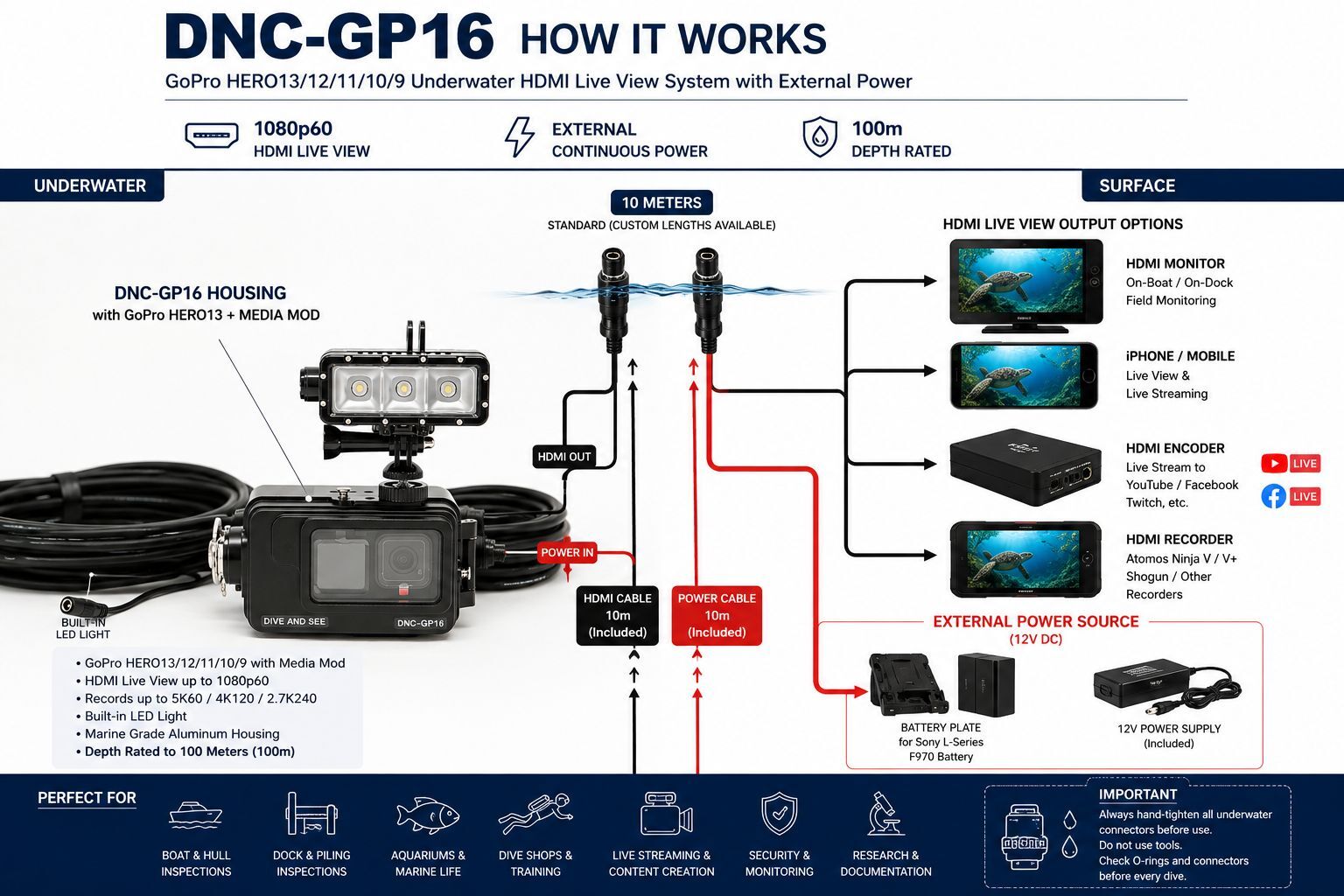
Diagram A — How DNC-GP16 Works
This diagram shows the main DNC-GP16 workflow: GoPro HERO camera with Media Mod inside the underwater housing, HDMI live view to the surface, external power for long operation, and integrated LED light for low-light underwater environments.
Key Benefits
- External Power + HDMI Live View: The main advantage of DNC-GP16 is real-time surface monitoring combined with long-duration external power.
- Real-time HDMI monitoring: View the underwater GoPro image on a surface monitor, recorder, switcher, HDMI encoder, laptop capture device, or compatible display.
- Continuous external power: Helps support extended underwater filming, inspection, monitoring, and streaming without relying only on the internal GoPro battery.
- Integrated LED light: Built-in 3 × 10W LED light helps improve visibility in shaded, low-light, or murky underwater environments.
- GoPro HERO13 compatible: Designed for GoPro HERO13 and compatible HERO models using the correct Media Mod HDMI output setup.
- Professional underwater workflow: Built for surface viewing and control, not only internal camera recording.
- 100m depth-rated housing: Designed for professional underwater environments when assembled and sealed correctly.
- Custom cable options: Cable length, connector configuration, mounting layout, and project-specific setup can be customized.
Why DNC-GP16 Is Different
Many GoPro housings are designed only to protect the camera while it records internally. The DNC-GP16 is different because it is built around a professional topside workflow. The GoPro stays underwater while HDMI video and external power are routed to the surface through underwater cables.
This makes the DNC-GP16 more useful for work where people on the surface must see what the camera sees in real time: underwater inspections, aquariums, swimming pools, dive training, search and recovery, marine research, remote monitoring, and live broadcast-style applications.
Important GoPro Media Mod Note
For GoPro HERO13, HERO12, HERO11, HERO10, HERO9, and HERO8 workflows, HDMI output requires the GoPro Media Mod. The GoPro camera and Media Mod are not included unless specifically added to the order.
How the System Connects
- Install the GoPro HERO camera with Media Mod inside the DNC-GP16 housing.
- Connect the internal HDMI and power connections.
- Close and seal the housing correctly before submerging.
- Connect the underwater HDMI cable to a surface monitor, recorder, switcher, encoder, capture card, or display.
- Connect the external power cable to the supplied 12V power source or compatible battery solution.
- View the GoPro image from the surface while filming, monitoring, inspecting, or streaming underwater.
Compatibility Ecosystem
The DNC-GP16 is part of the Dive And See underwater GoPro, HDMI monitoring, and external power ecosystem. It can be used with compatible surface monitors, HDMI recorders, capture cards, encoders, power solutions, and custom underwater video systems.
- DNC-7B Underwater Monitor
- DNC-7C Underwater Monitor
- DNC-5C Underwater Monitor
- DNC-GP23 GoPro HDMI + Power System
- DNC-GP29 GoPro HDMI + Power System
- DNC-1034 Fiber Optic HDMI Cable
Typical Systems Using DNC-GP16
- Boat hull and propeller inspection systems
- Dock, marina, and piling inspection systems
- Aquarium monitoring and public display systems
- Swimming pool monitoring and swim training systems
- Underwater live streaming and event production systems
- Marine biology and reef documentation systems
- Search and recovery support systems
- Dive shop demonstration and training systems
- Underwater construction and maintenance observation systems
- Compact underwater filming and monitoring systems
Why External Power Matters
Standard GoPro batteries are useful for short recording sessions, but they are not ideal for long underwater inspections, aquarium monitoring, live streaming, pool observation, or fixed-position underwater monitoring. The DNC-GP16 external power workflow helps the camera operate for extended periods while keeping HDMI live view available at the surface.
Integrated LED Light
The DNC-GP16 includes a built-in LED light system to help improve underwater visibility. This is useful in shaded inspection areas, indoor pools, aquariums, docks, murky water, and low-light underwater environments.
Custom Options
- Custom HDMI cable length
- Custom power cable length
- Connector orientation changes
- Pole, tray, tripod, and custom rig mounting layouts
- Project-specific monitoring and live-streaming configurations
- Alternative surface power and battery options
Specifications
| Product Model | DNC-GP16 |
| Product Type | Underwater GoPro HDMI live view housing system with external power |
| Compatible Cameras | GoPro HERO13 / HERO12 / HERO11 / HERO10 / HERO9 / HERO8 with Media Mod setup |
| HDMI Requirement | GoPro Media Mod required for HDMI output |
| Typical HDMI Live View | Up to 1080p60, depending on GoPro model, Media Mod, settings, and connected equipment |
| Standard HDMI Cable | 10m underwater HDMI cable included |
| Power Cable | 10m underwater external power cable included |
| Power Input | 7.4V to 24V DC recommended system range |
| Power Supply | 12V external power supply included |
| Battery Plate | Sony L-Series F970 battery plate included |
| Lighting | Built-in 3 × 10W LED light system |
| Housing Material | Marine-grade aluminum with hard anodized coating |
| Depth Rating | 100 meters / 330 feet / approximately 145 PSI |
| Mounting | Compatible with pole, tray, tripod, and custom rig mounting configurations |
| Custom Options | Custom cable lengths, connector configuration, mounting layout, and project-specific setup available |
Applications
Commercial and Industrial Inspection
- Boat hull and propeller inspections: View underwater conditions from a dock, boat, or service area.
- Dock, marina, and piling inspection: Monitor underwater structures in real time.
- Construction and maintenance: Observe underwater work zones, foundations, or submerged equipment.
- Search and recovery support: Use a compact GoPro platform for underwater visual confirmation.
Scientific, Educational, and Aquarium Use
- Aquarium monitoring: Display live underwater scenes for staff, visitors, or educational programs.
- Marine biology and reef documentation: Record or monitor underwater habitats using a compact GoPro platform.
- Water quality observation support: Add visual context to sensor, probe, or research data.
- Classroom and outreach projects: Show live underwater video to students or visitors.
Media, Dive, and Content Creation
- Underwater live streaming: Send HDMI to an encoder for YouTube, Facebook Live, Twitch, or other platforms.
- Dive shop demonstrations: Let people on the surface see what is happening underwater.
- Pool monitoring and swim training: Record or monitor underwater movement, technique, and training sessions.
- Underwater filming: Use HDMI live view for framing, recording, and monitoring underwater scenes.
Frequently Asked Questions
Does the DNC-GP16 work with GoPro HERO13?
Yes. The DNC-GP16 is designed for GoPro HERO13 and other HERO models when used with the correct GoPro Media Mod HDMI output setup.
Do I need the GoPro Media Mod for HDMI output?
Yes. For HERO13 / HERO12 / HERO11 / HERO10 / HERO9 / HERO8 workflows, HDMI output requires the GoPro Media Mod. The camera and Media Mod are not included unless specifically ordered.
What HDMI resolution is available?
The typical HDMI live view output is up to 1080p60, depending on the GoPro model, Media Mod, camera settings, and connected surface equipment.
Can I use this system for underwater live streaming?
Yes. The HDMI signal can be connected to a surface HDMI encoder, capture device, monitor, or recorder. For live streaming, the final workflow depends on the encoder, computer, phone, internet connection, and streaming platform.
Can I connect the DNC-GP16 to an Atomos Ninja or HDMI monitor?
Yes. The surface HDMI output can be connected to many HDMI monitors and recorders, depending on the complete HDMI signal chain.
Can the GoPro run continuously underwater?
The external power workflow is designed to support extended operation. Runtime depends on the power source, GoPro settings, temperature, Media Mod behavior, and the complete system configuration.
Is the LED light included?
Yes. The DNC-GP16 includes a built-in LED light system to help improve underwater visibility in low-light or shaded environments.
Can I order a custom cable length?
Yes. Dive And See can customize cable length and configuration depending on the project. For longer or more demanding systems, we may recommend a different HDMI, fiber HDMI, or SDI-based solution.
Is the GoPro camera included?
No. The GoPro camera and GoPro Media Mod are not included unless specifically listed in a custom package or quote.
What Is Included
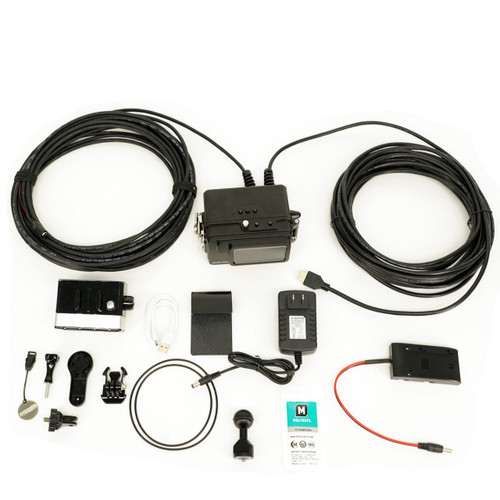
- DNC-GP16 underwater housing for GoPro HERO camera
- 10m underwater HDMI cable
- 10m underwater external power cable
- 12V power supply
- Battery plate for Sony L-Series F970 battery
- Built-in LED light system
GoPro camera and GoPro Media Mod are not included unless specifically ordered as part of a custom package.
Important Housing Sealing Warning
Before every dive or underwater use, carefully verify that the DNC-GP16 housing is fully closed and properly sealed. Make sure the O-ring sealing surfaces are clean and free from sand, hair, dust, water drops, cable fragments, or any foreign objects. Before closing the housing, confirm that no internal cable, wire, strap, or accessory is trapped between the two housing halves. A cable caught between the housing halves can compromise the waterproof seal and may result in flooding or equipment damage. Always inspect the O-rings, sealing surfaces, internal cable position, and housing closure before submerging the unit.
SEO Reference
Recommended Product Name: DNC-GP16 GoPro HERO13 Underwater HDMI Live View System with External Power
Recommended Page Title: DNC-GP16 GoPro HERO13 Underwater HDMI Live View System with External Power
Recommended Meta Description: Professional DNC-GP16 GoPro HERO13 underwater HDMI live view system with external power, integrated LED light, Media Mod HDMI workflow, 10m HDMI and power cables, and 100m depth rating.
Recommended Diagram File Name: dnc-gp16-gopro-hero13-underwater-hdmi-live-view-system-diagram-a.jpg
Recommended Diagram ALT Text: DNC-GP16 GoPro HERO13 underwater HDMI live view system diagram showing external power, HDMI monitoring, Media Mod, integrated LED light, and real-time 1080p60 video output